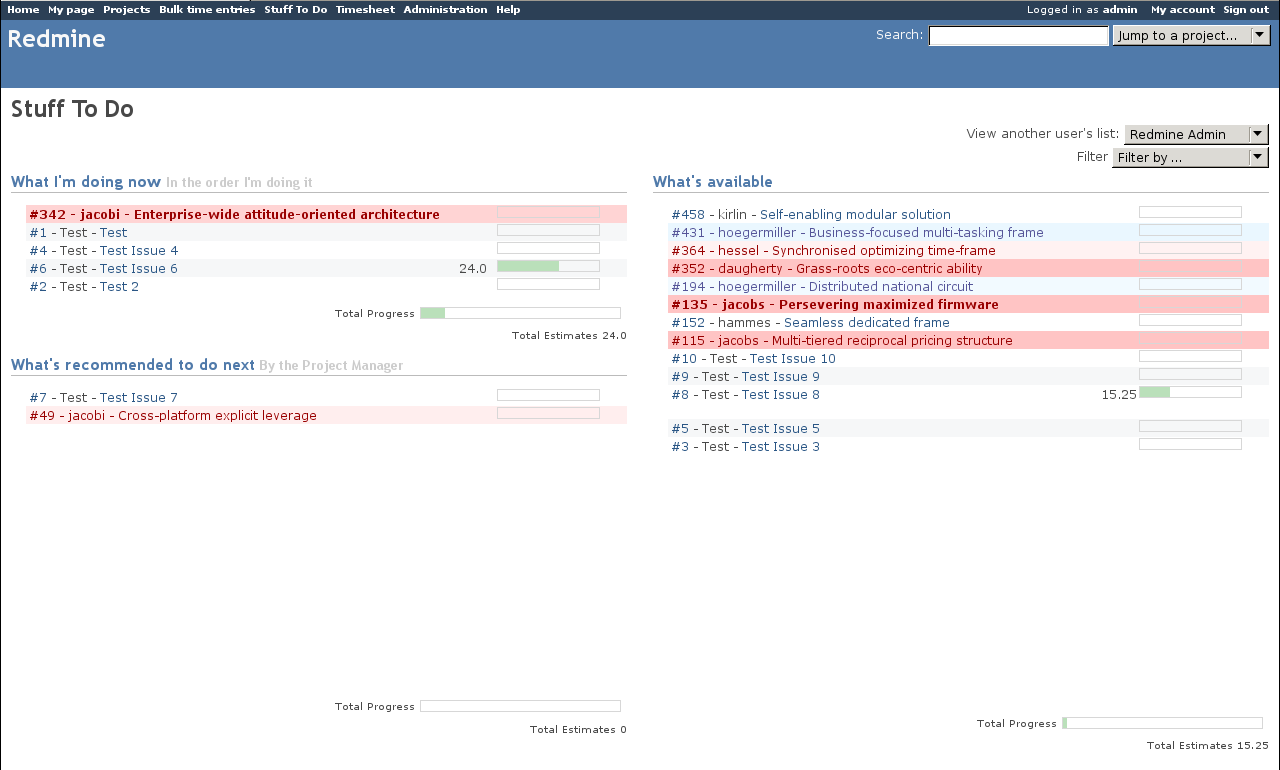
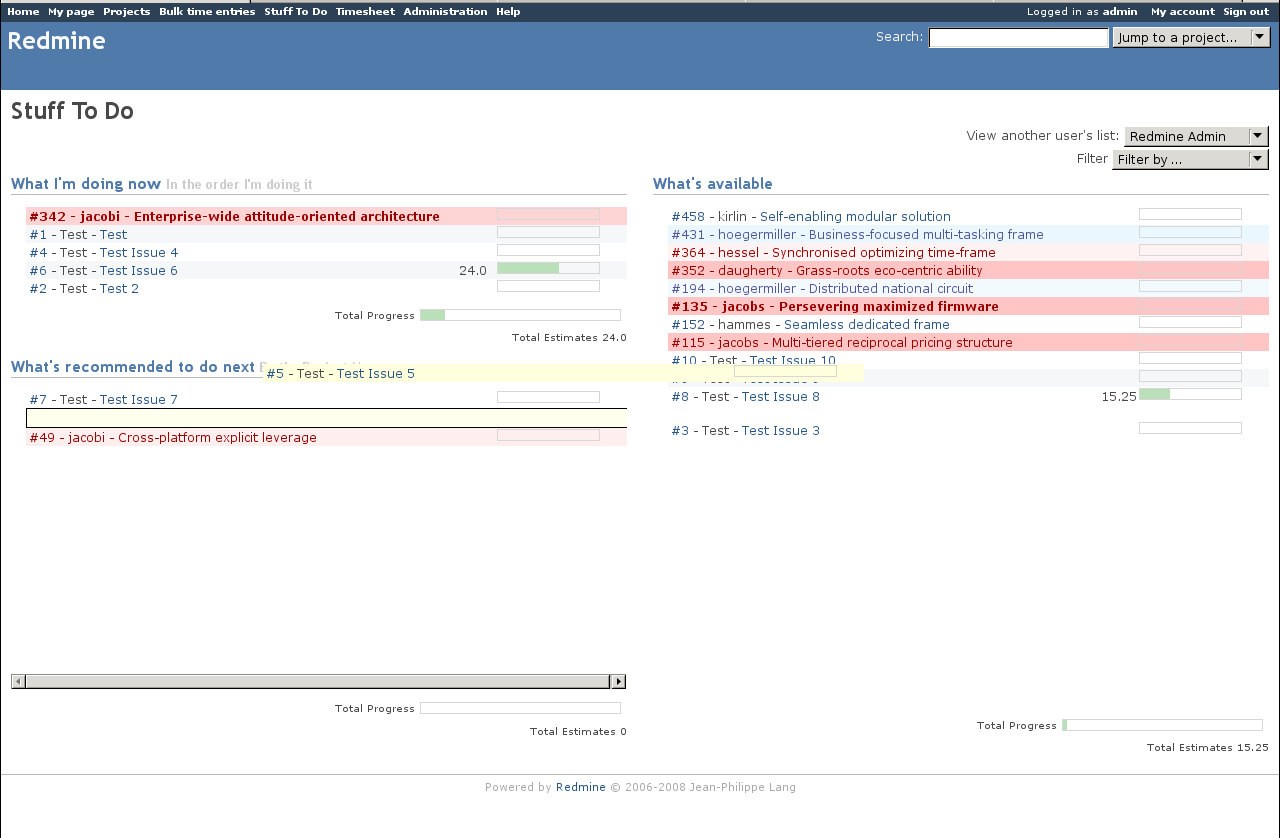
To keep up with all my Redmine plugins, I’ve Open Sourcing a new plugin, the Stuff To Do plugin. If you have ever run a project and had to consistently tell people what to work on next, this plugin is for you. It will let a user to order and prioritize the issues they are doing into a specific order across multiple Redmine projects.
Features
- Sorting and prioritizing of cross-project To Do lists
- Easy to use drag and drop interface
- Editing other user lists for Administrators
- Filtering of issues based on user, priority, or status
- Notification emails based on low issue counts
Getting the plugin
A copy of the plugin can be downloaded from Little Stream Software or from GitHub
Usage
There are three panes that can be sorted:
What I’m doing now
This pane lists the next 5 issues a user is supposed to be working on. These issues should be the most important issues assigned to the user. As the user closes an issue, the items lower in the list will rise up and fill in this pane.
What’s recommended to do next
This pane lists up to 10 extra tasks for the user. These tasks are used as overflow for the What I’m doing now.
What’s available
This pane lists all the open issues that are assigned to the user. They are the pool of issues that a user can draw on as they work on issues.
Workflow
The standard workflow for this plugin is as follows:
- A user will drag issues from the What’s Available pane to the What I’m doing now and What’s recommended to do next
- Once 15 issues have been dragged (5 Now, 10 Next) the user would prioritize and sort the issues in order of importance
- The user would use the rest of Redmine and work on the #1 issue
- Once the #1 issue is complete (or blocked) the user would continue and work on the #2 issue
If the user is an Administrator, they have the permission to edit other users’ lists. This allows them to act as the system Project Manager.
License
This plugin is licensed under the GNU GPL v2.
Project help
If you need help you can contact me or create an issue in the Bug Tracker.
Thanks
I would like to thank Tim Haskins from Copious Creative for sponsoring this plugin. If you find it useful, send your appreciation his way.
If you are currently working on a Redmine plugin and need help or have an idea for a plugin you would like developed, please contact me. My company, Little Stream Software, specializes in the development of custom Redmine features and Redmine plugins.
Eric
Hey your people work on cool stuff!
Self-enabling modular solutions!
Humor aside, I think its great that you open source you plugins.
Not only is it modular but it’s a cross platform Web 2.0 drag and drop enterprise SOA ready solution for SME!
;)
I’m happy to be able to work with people who allow me to Open Source the results. It helps everyone in the community.
Nice plugin! I’m using it to prioritize my teams work. I’m also using the question plugin and am waiting for the Scrumm tools to materialize.
Would be cool to have some more advanced management features in the TODO plugin. It would be cool to be able to see al open issues (for a project) and assign them directly by adding them to a users todo list.
I’ve also wipped up a Dutch translation file for both the question and the TODO plugin. I’ll get them to you when I’ve solved my problems registering with your issue tracker.
Shhh, the Questions plugin hasn’t been released yet. ;)
> Would be cool to have some more advanced management features in the TODO plugin. It would be cool to be able to see al open issues (for a project) and assign them directly by adding them to a users todo list.
If you are an administrator, you should see a Filter field where you can change the list to show different priorities, users, or statuses. Adding a list of projects would be a good idea, I opened a new feature for it.
> I’ve also wipped up a Dutch translation file for both the question and the TODO plugin. I’ll get them to you when I’ve solved my problems registering with your issue tracker.
Thank you. I’ve activated your account manually, the email must have gotten lost.
Thanks for offering this great plugin, I just got it installed and it works like a charm.
I have no idea where to post suggestions, so I figured I will give it a try over here: It would be great if people could view the ToDo lists of other people.
Or too put it in another way: I am working on a one man project with quite a active community, that is sort of impatient (in a positive way). User keep on asking “what are you working on currently” and it would be great if I could simply direct them to my profile (or another page) and say “have a look”.
@Marcus: Thank you. I have a project in my [Redmine](https://projects.littlestreamsoftware.com/projects/redmine-stuff-to-do) for bugs and feature requests.
If you are an Administrator, you can view another user’s list. We haven’t figured out an easy way to let users see other user’s lists without revealing private information. There are a few issues logged for this request, I’d love to hear your feedback on the ideas we have:
* [#1565](https://projects.littlestreamsoftware.com/issues/1565)
* [#1945](https://projects.littlestreamsoftware.com/issues/1945)
* [#1952](https://projects.littlestreamsoftware.com/issues/1952)
* [#2076](https://projects.littlestreamsoftware.com/issues/2076)
Hi,
I have a query which i have already raised at the redmine site.Its regarding the redmine stuff to do plugin.
I have successfully installed the plugin but having a problem while dragging the issues into the other location of “what my doing” and “what i am recommended to do”.I get an error stating that “Error saving lists. Please refresh the page and try again”.Can any one help me on this issue.Have i missed some settings…
The “Error saving lists” is the generic error the plugin uses if the JavaScript can’t save to the server. In the latest Git version, I’ve fixes a few bugs including one that affects the plugin if it’s installed to a directory (e.g. http://example.org/redmine). You might want to download that one and test it.
If you’re still having problems, please report this bug and the details of how you have Redmine setup to my bug tracker:
https://projects.littlestreamsoftware.com/projects/redmine-stuff-to-do/issues
Hey there, this is so perfect for what we need, but I’m having a crazy problem installing it on Cent and I don’t know ruby very well. Any ideas about this error:
[lucas@mail plugins]# rake db:migrate_plugins
(in /home/redmine)
rake aborted!
undefined method ‘url’ for #
Thanks,
Lucas
@Lucas: you need to be running Redmine 0.8.x in order to use the Stuff To Do plugin. [#2102](https://projects.littlestreamsoftware.com/issues/2102)
Thanks for a good plugin. I have a suggestion to get it even better.
I think it would be better if the “What I’m doing now” actually shows issues that the user is working on now. And that “What’s recommended to do next” is issues that the user can do next. :).
I mean that I as a project manager would like to add issues to “What’s recommended to do next” and when the developer starts doing them he adds them to “What I’m doing now”. Then I would know what issues is in progress. When the developer finish his issues he can take a issue from “What’s recommended to do next”.
@Roger: We actually have a different idea for this. Instead of having just one issue in What I’m doing now, we would give a user the ability to pick an issue they are “working on now”. I’m thinking of making that a right click option while on the Stuff To Do list and the main issues list and then highlight the current task in a green background.
So a user would:
1. Open their Stuff To Do list
2. See they have 5 things to work on next
3. Notice that the second item needs to be done before the first
4. Right click on the second Item and click “Working on this next”
Then when the project manager comes into the user’s Stuff to Do list, they would be able to see what they are working on. You can see some more details about these features on my Redmine:
* [#1547][1]
* [#1561][2]
* [#2237][3]
If you think of any other ideas that you think is useful, feel free to open a [feature request](https://projects.littlestreamsoftware.com/projects/redmine-stuff-to-do).
Eric
[1]: https://projects.littlestreamsoftware.com/issues/1547
[2]: https://projects.littlestreamsoftware.com/issues/1561
[3]: https://projects.littlestreamsoftware.com/issues/2237
Thanks Eric for the quick response. I really appreciate it. It is a good plugin and I look forward to future updates.
Roger
Hi Eric,
I’m really enjoying this plugin, with a couple of minor problems:
Whenever I try to drag something from “What I’m working on now” down into “What’s recommended to do next” it just snaps back up again. Is that what’s supposed to happen?
When I try to filter “What’s Available” by status, I see everyone’s bugs, not just mine, that have that status. (I have the ability to see other peoples’ bug lists.) Is that intentional? I’d really like to be able to filter my personal list by status.
what a great article, i really like it.
This looks like it would be good for managing tickets in a scrum/agile project. Has anyone used it in an agile project?
I think it would work well..
what I’m doing now + whats reccomened == current iteration
what’s avilabe == backlog
The only issue I can see is that tickets have to be assigned to you to appear in what’s avaible.. normally, tickets in the backlog aren’t assigned to anybody.
Can that be done easily?
No, by default when the plugin loads the Available list is things assigned to the user but you can change it to:
* Issues assigned to another user
* Issues with a priority (e.g. High priority)
* Issues with a status (e.g. New)
* List of Projects
redmine 2 version ??
I don’t support Redmine 2 with any of my plugins.